Swimlane Timeline v8 supports the following environments:

Swimlane Timeline v8.10 Now Available!
- Added Project Pre-filter and/or pre-apply Style capability to save time creating reports from MS Project
- Added Conditional Format User Interface that makes it quick & easy to create custom formatted data-driven reports
- Added Rolling Date Range functionality so “Refresh” can now auto-update the date range based on today’s date
- And much more! (See What’s New PDF)

- Windows 7, Windows 8 and Windows 10
- Any edition of Visio 2010-2016
- Any edition of Office 2010-2016 including Office 365
- Any edition of Project 2010-2016 including Project Online
(Project Online requires Project Professional 2016)

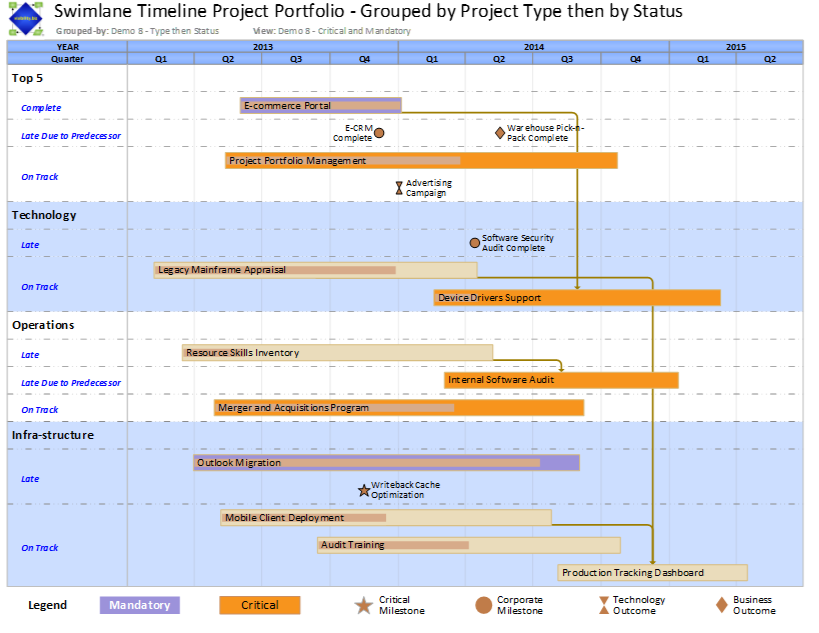
The Swimlane Timeline is an award winning VISIO add-on that helps organization quickly convert PROJECT, PROJECT SERVER, EXCEL, and SHAREPOINT TASK LIST data into standardized project, portfolio and roadmap reports that are easy to generate, customize and share in WORD documents and POWERPOINT presentations.
The Swimlane Timeline helps companies align cross-functional teams around the work ahead during crunch times. It allows targeted conversations around critical path, risk management, and workload evaluation. The Swimlane Timeline contributes to critical path acceleration and increases the financial revenue of projects.
The Swimlane Timeline can read and process single, multiple and mixed MPP, Excel, EPM, and SharePoint Task List source data. Users can dynamically interact with their data in real-time. Quickly FOCUS on Key Performance Indicators (KPI’s) with Filter, Group and Sort options. Generate accurate and consistent reports FAST using 1-Click “Style” and “Refresh” options. Swimlane Timeline drawings are EASY to share, decipher, and understand.
The Swimlane Timeline Professional Edition adds support for SharePoint Task Lists. Quickly Group, Filter, and Sort your SharePoint Task List data as well as Project Server schedules, Project MPP files, and Excel source files.
Swimlane Timeline Licensing
Swimlane Timeline licensing is per-computer. That is, it can be installed on one computer at a time. It can be transferred to another computer by un-installing it from computer A (to free up the license), and installing and re-registering it on computer B.
Each license comes with rights to 2 years of software version upgrades and support . After the initial 2 years have lapsed, users have the option to continue using the version installed in perpetuity without support, or renew their license at a reduced cost to continue rights to future software upgrades and support for another 2 years.
The Swimlane Timeline is client software, and once it is installed on a PC it is a perpetual on-premises product, and there is no internet access required to use it, and there is no data shared with Visibility other than during the initial installation and registration process. The Swimlane Timeline software has the additional option to be registered and activated manually off-line for those users without internet access.