
Swimlane Timeline product support is available to resolve software issues occurring when the product is not working as documented in the Swimlane Timeline User’s Guide. Visibility.biz will respond to support issues within eight business hours between the hours of 9am to 5pm central standard time (excluding holidays and weekends). Visibility.biz will make every effort to respond and resolve a support issue within 24 business hours.
Swimlane Timeline Blog
Can I display text with Date Markers?
Yes, you can customize Date Markers to display text by enclosing your text in single quotes (') in the "Custom"…
Read MoreTutorial – Creating Custom Conditional Format Views & Legends
Add another dimension of insight to your Swimlane Timeline reports with conditional formatting and legends to highlight key tasks for…
Read MoreCan I change the Baseline View formatting?
The "ST Add/Show" menu Baseline View option gets its formatting from the currently applied color palette. Although, the Baseline View…
Read MoreHow can I automatically get tasks in Swimlanes to be shown in the order that I want, and have that ordering preserved on Refresh?
By default, tasks are placed in swimlanes in the order they are encountered in the source data after applying our…
Read MoreHow do I get my Project Online Enterprise fields to be brought in to the Swimlane Timeline?
The Swimlane Timeline will read in all of the Project Online Enterprise Fields that are showing in the Gantt Chart…
Read MoreDoes the Windows Region Date Format matter?
The Swimlane Timeline expects that the Windows OS date format is set to a format that has a 4-digit year setting (yyyy). …
Read MoreDoes the Swimlane Timeline work if I am using non-English versions of Visio, Office and Project?
Yes, the Swimlane Timeline does work with non-English versions of Visio, Office and Project, but there are a couple of…
Read MoreHow do I start the Swimlane Timeline from within Visio?
Open Visio then "File/New" and by default you will see the "Featured" Visio solutions. Now select to see all solution "Categories". Navigate…
Read MoreHow can I change the default width of the swimlane title area?
You can quickly and easily override the default width of the swimlane title text box area by clicking on the…
Read MoreThe Swimlane Timeline menus are no longer showing in Visio. How can I fix this?
Windows can sometimes turn off all application add-ins. If you don't see the Swimlane Timeline menus in Visio anymore when…
Read More
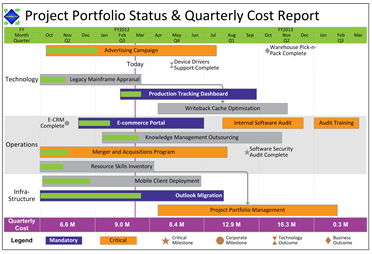
Swimlane Timeline v8.10 is here!
New v8.10 Enhancements Include:
- Fix for those getting “No Data was Found” after applying Microsoft Windows October 2017 Security Update that breaks the Windows JET database connectivity engine.
- Added option to display taskEndpoint Arrows when partial date range is specified.
- Enhanced Custom Text option to support Windows date format syntax when date fields are selected to be shown.
- Enhanced Custom Format option by adding the ability to move conditional test rows Up and Down since the order can impact the priority of formatting applied.
- Enhanced Custom Filter to support MS Project “Active” field values.
