How can I automatically get tasks in Swimlanes to be shown in the order that I want, and have that ordering preserved on Refresh?
By default, tasks are placed in swimlanes in the order they are encountered in the source data after applying our shape and text collision avoidance algorithms. The Swimlane Timeline task Sort option can automatically reorder the tasks in swimlanes based on values in a custom task field.
If you had a custom task text field, for example “ST Sort”, and it contains values A1-A9, B1-B9, C1-C9, …etc. then in the Swimlane Timeline you can reorder tasks within swimlanes by selecting “ST Sort” from the field pick list in the task Sort option. Tasks will be placed within swimlanes in alphanumeric order, and any tasks with the same “ST Sort” value will be grouped together within a swimlane.
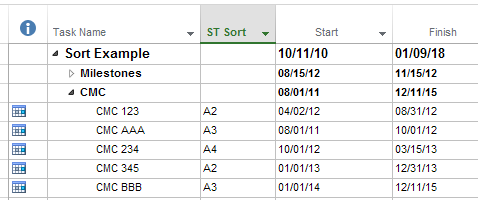
Let’s say the source data with the “ST Sort” field looked like this:
Default layout – compressed, with text and shape collision avoidance auto-applied, and tasks shown in the order encountered:

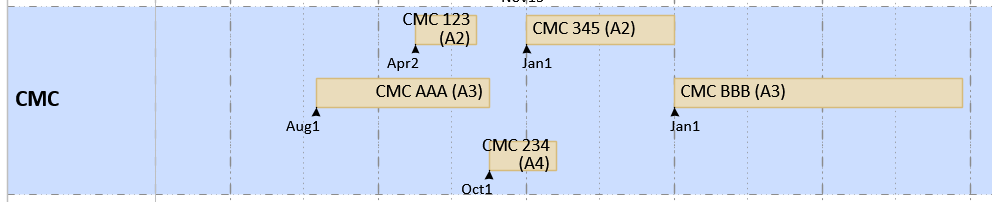
Task layout after applying task Sort and specifying the “ST Sort” field (NOTE: Tasks are placed in alphanumeric order, and any tasks with the same “ST Sort” value are grouped together):